Kotoba, Part II: From a Web Tool to a Native iOS App
Tags: Japanese · JLPT · iOS · SwiftUI · Claude Code
App Store: ことば - JLPT単語帳
More: wangpeifeng.com/kotoba
In June I wrote about Kotoba, a small web tool I built for my own JLPT vocabulary study. That post ended with this line:
There is no plan to build a native app in the short term.
Five months later, Kotoba is a native app for iPhone and iPad, and it is live on the App Store.
I'm publishing this on the day I've been in Japan for exactly four years. Learning Japanese has been part of every one of those years, so it feels like the right day.
Why a Native App After All
I use Kotoba every day, mostly on my phone, and the web version kept running into the same limits:
- Reviews were easy to forget. A website can't put today's words on the Home Screen or remind me in the evening.
- Progress lived in one browser. Moving to another device meant exporting and importing a file.
- It never quite felt like an app. Swiping cards in a browser works, but it isn't as smooth as it should be for something I do a hundred times a day.
None of these could be fixed well on the web, so I rebuilt Kotoba from scratch as a native app.
What's in the App
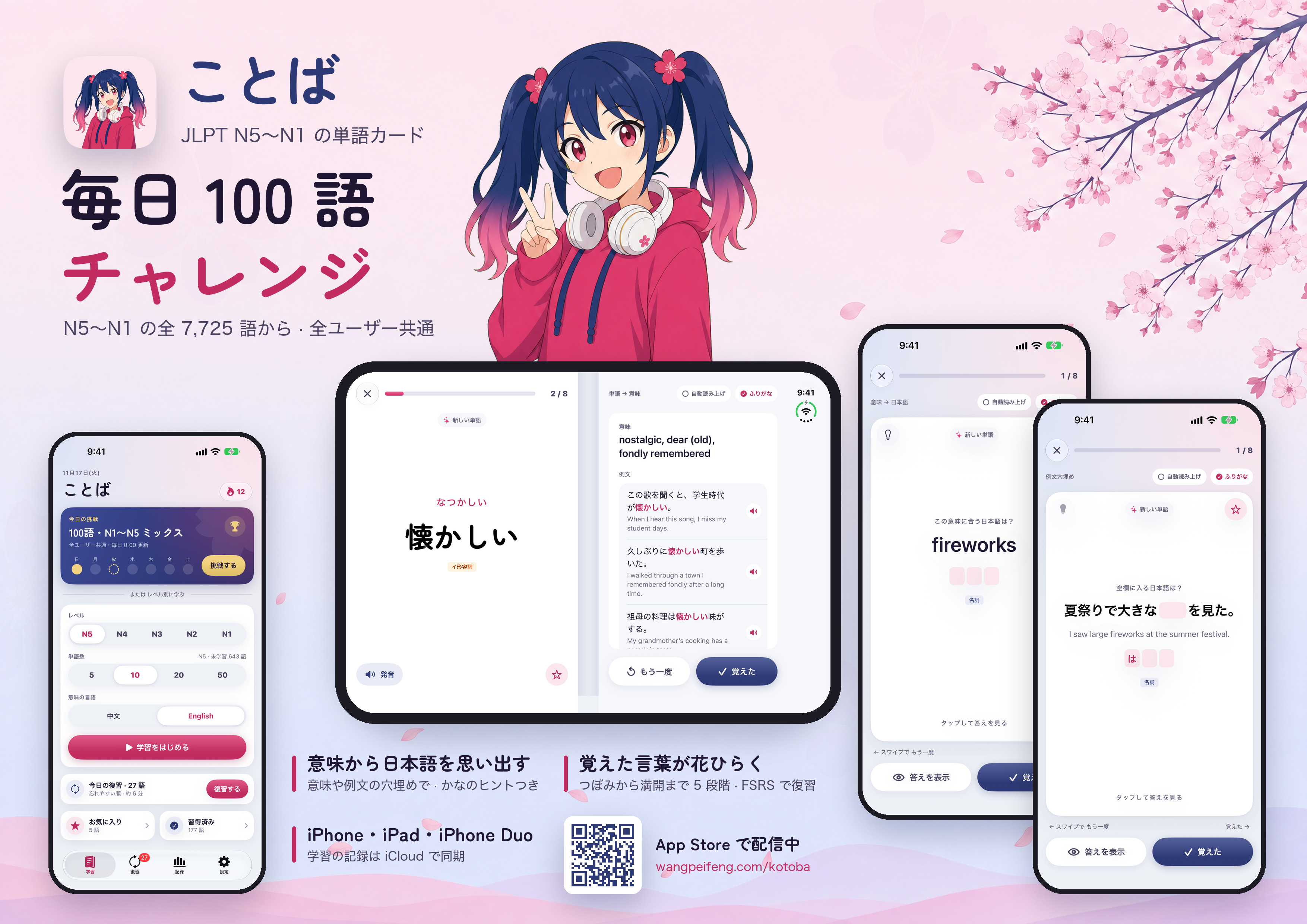
The Daily 100-Word Challenge
This is still the heart of Kotoba. Every day, 100 words are picked from the full N5–N1 list, and everyone gets the same set.
Three Ways to Recall a Word
The web version only went one way: see the word, remember the meaning. The app has three:
- Word → meaning: see the Japanese word and recall what it means.
- Meaning → word: see the meaning and recall the Japanese word.
- Fill the blank: an example sentence with the word missing, and a kana hint if you need one.
Recalling a word from its meaning is much harder than recognizing it, and it is the part I needed most.
Words That Bloom
Reviews are scheduled with FSRS, a spaced-repetition algorithm that brings each word back right before you would forget it. The web version's Mistake List is gone: a word you miss simply comes back sooner.
Each word also grows through five stages, from a bud to full bloom, so you can see how well you know it at a glance.
Cards, Examples and Audio
Every word has its reading, part of speech, meanings in English or Chinese, and three example sentences. The word is highlighted in each sentence, even when it is conjugated, and both the word and the sentences can be read aloud.
iPhone, iPad and iPhone Duo
The app runs on iPhone and iPad. In landscape on iPad, and on the iPhone Duo's inner display, a card opens as a two-page spread: the word on the left, meanings and examples on the right.
Everything Else
- Home Screen widgets for today's words and reviews due
- A streak, a study calendar and progress for every level
- Favorites
- Light, dark and sakura themes
- Interface in Japanese, English, Simplified or Traditional Chinese
- iCloud sync between your devices
Still No Account, Still No Ads
This part hasn't changed, and it is still an intentional choice.
Kotoba is free. There is no account, no ads and no tracking. The app is under 14 MB and works fully offline. Your progress stays on your devices and in your own iCloud, and I don't collect any data.
There is still no backend of my own. iCloud does the syncing, so there is nothing for me to run and nothing for you to sign up for.
Rebuilding the Vocabulary Data
While porting the app I found that the web version's data had real mistakes. Words had been matched to dictionary entries by reading alone, so some came out as the wrong word: もう ("already") had been matched to 毛, a rare unit of measure with the same reading.
So I rebuilt the data for this release:
- The word lists still come from the JLPT lists on tanos.co.uk.
- Each word is matched to its entry in JMdict by spelling, reading and meaning together.
- Every entry was then re-checked, one by one: its level, its meanings, its part of speech, its example sentences and the highlighted word in each sentence.
- Words usually written in kana are now shown in kana, with the kanji in gray beside them.
The result is 7,725 words. A few dozen rare readings and bare prefixes and suffixes were left out, because they aren't useful as flashcards.
How It Was Built
My everyday work is on the web, not in Swift. I built the app with AI tools:
- App design: Claude Design (Fable 5.2)
- Code: Claude Code (Opus 5.5)
- Character and poster art: OpenAI's gpt-image-2
My part was deciding what the app should be, testing every build on my own phone, and sending back a long list of small things that felt wrong. Most of the time went into those details: how a card swipes, which form of a word to show, what the report looks like after a session.
The girl on the icon and the poster is Kotoba's mascot. She was picked from several rounds of candidates, and she now appears on the loading screen and the share cards too.
What About the Web Version?
It stays online at kotoba.wangpeifeng.com, for anyone who prefers the browser or doesn't use an iPhone.
What's Next
- Kotoba Puzzle for iOS. Kotoba Puzzle is planned as the next migration, and it may start next month.
- Sharing. A share card for your results after a session is already in the works.
- Your suggestions. I use Kotoba every day, but I'm one learner. If something feels wrong or missing, please tell me.
You can reach me at:
Or join the Discord server:
Technical Information
- Language: Swift
- UI: SwiftUI
- Storage and sync: SwiftData + CloudKit
- Widgets: WidgetKit
- Review scheduling: FSRS
- Data sources: tanos.co.uk JLPT lists, JMdict (CC BY-SA 4.0)
- Built with: Claude Design, Claude Code, gpt-image-2
Keep learning. Keep improving.
Kotoba — A lightweight JLPT vocabulary trainer.
N5 から N1 まで、毎日少しずつ。